
Authentication
Audience: Every integrator. Reading time: ~8 minutes. Prerequisites: None. You'll learn: How to sign in, obtain API keys, authenticate RPC and REST requests, and manage your credentials.
Overledger Fusion supports two credential types:
- JWT Bearer token — obtained by signing in to Quant Connect. Used for REST API calls and for minting API keys.
- API Key — a self-managed credential (
fk_<keyId>.<secret>) minted via the REST API. Used for RPC calls and, optionally, REST API calls.
3.1 Create a Quant Connect account
-
Go to Quant Connect and create an account.
-
Sign in. Your browser session provides a JWT that authenticates REST API calls and lets you mint API keys.
3.2 Mint an API key
API keys are created via the REST API. You need a valid JWT (from your Quant Connect session) to mint one.
Set up your environment variables first:
export OVERLEDGER_URL="https://fusion-rollup.quant.dev"
export ACCESS_TOKEN="<your JWT from Quant Connect>"
Then mint a key:
curl -X POST "$OVERLEDGER_URL/users/me/api-keys" \
  -H "Authorization: Bearer $ACCESS_TOKEN" \
  -H "Content-Type: application/json" \
  -d '{"label": "My RPC key"}'
The response includes the raw API key once — it cannot be retrieved afterwards:
{
  "apiKey": "fk_abc123DEF.ghi456JKL...",
  "keyId": "abc123DEF",
  "label": "My RPC key",
  "scopes": ["rpc"],
  "createdAt": "2026-06-11T12:00:00.000Z"
}
Save the apiKey value securely. You will use it to authenticate RPC requests (and optionally REST requests). For the examples that follow:
export API_KEY="<paste the apiKey value from the response above>"Optional fields when minting:
| Field | Type | Description |
|---|---|---|
label | string | Required. A human-readable name for the key (1–100 characters). |
scopes | string[] | Scopes to grant. Defaults to ["rpc"] if omitted. Currently rpc is the only supported scope. |
expiresAt | ISO-8601 string | Optional expiry date. Must be in the future. If omitted, the key does not expire. |
You may hold up to 10 active API keys at a time. To create more, revoke an existing key first (see section 3.4).
Warning, Save your API key immediatelyThe raw API key is shown only once at mint time. Store it in a secrets manager or environment variable immediately.
3.3 Authenticate your requests
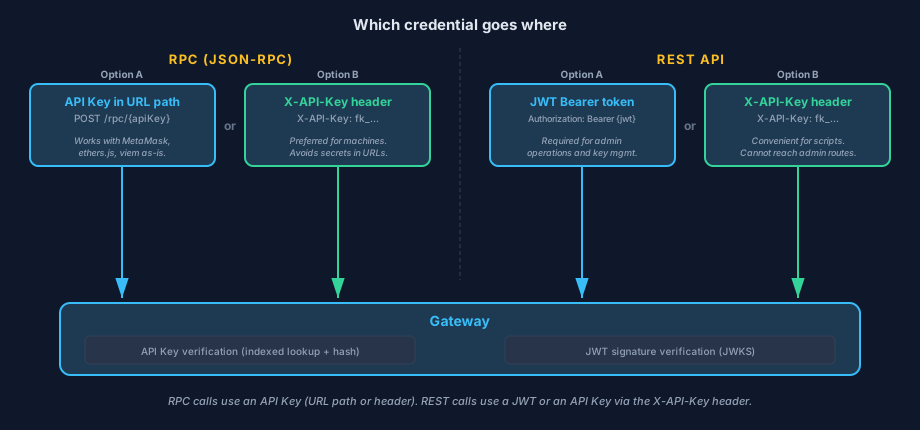
RPC calls carry an API Key — either in the URL path or via the X-API-Key header. REST API calls carry a JWT or an API Key via the X-API-Key header.
RPC requests
Blockchain JSON-RPC calls can be authenticated in two ways:
Option A: API Key in the URL path
Place your API key directly in the URL. No Authorization header is needed:
POST /rpc/{apiKey}
POST /dlts/{dlt}/networks/{networkId}/rpc/{apiKey}
POST /dlts/{dlt}/nodes/{nodeId}/rpc/{apiKey}
Example:
curl -X POST "$OVERLEDGER_URL/rpc/$API_KEY" \
  -H "Content-Type: application/json" \
  -d '{"jsonrpc":"2.0","method":"eth_blockNumber","params":[],"id":1}'
This lets you point off-the-shelf EVM tooling (ethers.js, viem, MetaMask) at Overledger with no header customisation — set the RPC URL to https://<gateway-host>/rpc/<your-api-key>.
Warning, RPC URL is a credentialURLs that contain your API key are themselves credentials. They may be logged by load balancers and CDNs. Prefer the
X-API-Keyheader (Option B) for server-side integrations where you can set headers.
Option B: X-API-Key header
X-API-Key headerPass your API key in the X-API-Key header. The URL contains no secret:
curl -X POST "$OVERLEDGER_URL/rpc" \
  -H "Content-Type: application/json" \
  -H "X-API-Key: $API_KEY" \
  -d '{"jsonrpc":"2.0","method":"eth_blockNumber","params":[],"id":1}'
The X-API-Key header is case-insensitive and takes precedence over any Authorization header when both are present.
REST API requests
Non-RPC endpoints (such as /users/me/*) can be authenticated in two ways:
Option A: JWT Bearer token
Pass the JWT from your Quant Connect session in the Authorization header:
curl "$OVERLEDGER_URL/users/me/id" \
  -H "Authorization: Bearer $ACCESS_TOKEN"
Option B: X-API-Key header
X-API-Key headerAPI keys also work on REST endpoints — pass them via the X-API-Key header:
curl "$OVERLEDGER_URL/users/me/deployed-contracts" \
  -H "X-API-Key: $API_KEY"
Info, Admin endpoints require a JWTAPI keys cannot be used to access admin-only endpoints. Admin operations require a JWT with the appropriate role.
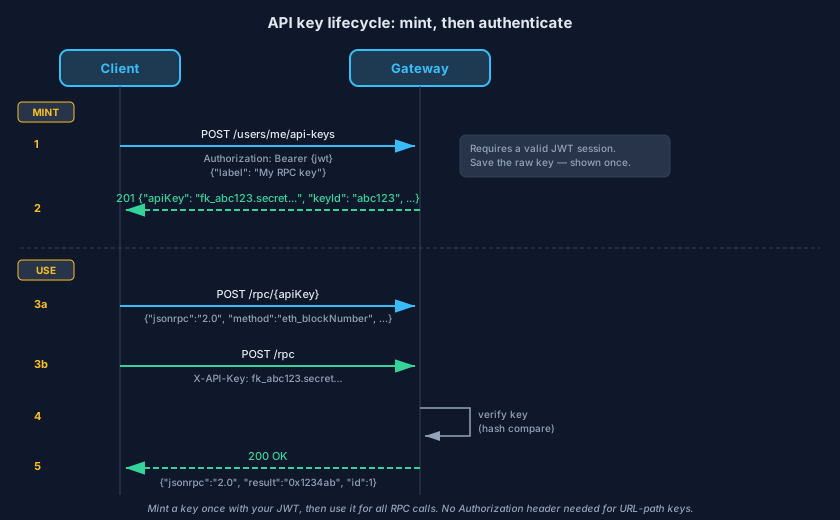
Mint a key once using your JWT (steps 1–2), then use it for all subsequent RPC calls — either in the URL path (3a) or via the X-API-Key header (3b). The Gateway verifies the key locally (step 4) and returns the response (step 5).
Authentication errors
Authentication failures return different response shapes depending on the route.
RPC routes return a JSON-RPC 2.0 error object:
| HTTP status | JSON-RPC code | message | Cause |
|---|---|---|---|
401 | -32000 | Missing credentials. | No API key in the URL path or X-API-Key header. |
403 | -32001 | Invalid credentials. | API key not recognised, revoked, or expired. |
500 | -32002 | Internal server error. | Credential verification failed (transient). |
REST routes return a standard error:
| HTTP status | Meaning |
|---|---|
401 | Missing or invalid Authorization header / X-API-Key header, expired/malformed JWT, or JWT missing required claims. |
403 | Valid credentials but the caller lacks the required permission for this resource (e.g. admin role required). |
See chapter 11 for the full error envelope reference.
Rate limits
Authenticated requests are subject to rate limiting. The Gateway enforces two layers:
- Per-user limit — applied across all requests from the same authenticated identity (default: 300 requests per minute).
- Per-session limit — applied per Flow App session when a
sessionIdis in the request path (default: 60 requests per minute).
When you are rate-limited, the response is HTTP 429 with the following headers:
| Header | Meaning |
|---|---|
X-RateLimit-Limit | Maximum requests allowed in the current window. |
X-RateLimit-Remaining | Requests remaining in the current window. |
X-RateLimit-Reset | Unix timestamp (seconds) when the window resets. |
Retry-After | Seconds to wait before retrying (present only on 429 responses). |
Tier-specific quotas may differ from the defaults above. See chapter 4.5 for more detail.
3.4 Manage your API keys
All key management operations require a valid JWT in the Authorization header. API keys cannot be used to manage other API keys.
List your keys
curl "$OVERLEDGER_URL/users/me/api-keys" \
  -H "Authorization: Bearer $ACCESS_TOKEN"
Returns a list of your keys with metadata (no secrets):
{
  "data": [
    {
      "keyId": "abc123DEF",
      "label": "My RPC key",
      "scopes": ["rpc"],
      "createdAt": "2026-06-11T12:00:00.000Z",
      "lastUsedAt": "2026-06-11T14:30:00.000Z"
    }
  ]
}
Revoke a key
curl -X DELETE "$OVERLEDGER_URL/users/me/api-keys/$KEY_ID" \
  -H "Authorization: Bearer $ACCESS_TOKEN"
Revocation is immediate — the key stops working on the next request. Revoked keys remain in the list (with a revokedAt timestamp) for audit purposes and do not count against the active key limit.
Info, Revocation has a short propagation delayVerified API keys are cached for up to 60 seconds. After revocation, the old key may still be accepted briefly on other Gateway instances while the cache expires. Plan accordingly if you need a hard cut-over.
Rotate a key
There is no in-place rotation. To rotate, mint a new key, deploy it, then revoke the old one:
POST /users/me/api-keys— mint a replacement key.- Update your integration to use the new key.
DELETE /users/me/api-keys/{oldKeyId}— revoke the old key.
This ensures zero downtime — both keys are valid during the transition window.
3.5 Security guidance
Never check credentials into version control. Use environment variables in development and a secrets manager (AWS Secrets Manager, HashiCorp Vault, Doppler, etc.) in production.
Prefer the X-API-Key header over URL-path keys for server-side integrations. URL-path keys appear in access logs (load balancers, CDNs, web servers). The X-API-Key header keeps the secret out of the URL.
Use separate API keys per environment. Mint one key per stage (dev, staging, prod) so revoking a compromised key doesn't take down unrelated services.
Set an expiry on keys when appropriate. For CI pipelines or time-boxed integrations, set expiresAt when minting. The key will stop working automatically after that date.
Rotate keys proactively. Mint a replacement before revoking the old key to avoid downtime (see section 3.4).
A leaked API key cannot move funds. API keys authenticate RPC access — they identify the caller. Blockchain transactions still require a signature from the caller's own wallet private key. However, a leaked key could be used to consume your RPC quota or read chain data through your account, so revoke compromised keys promptly.
Audit regularly. GET /users/me/api-keys shows all your keys, their last-used timestamps, and revocation status. GET /users/me/history returns deposit, swap, and withdrawal history. Monitor both for unexpected activity.
Updated 4 months ago