
Flow Apps
Audience: Integrators driving Flow App sessions from a client (browser, server, agent host). Reading time: ~12 minutes. Prerequisites: Chapter 4: Overledger Gateway. You'll learn: What Flow Apps are, the Prepare-Sign-Execute pattern you'll encounter when consuming them, how the same app renders for humans, tech services and AI agents, x402 payment gates, content filtering, agent integration via MCP, webhooks, and the catalogue of built-in apps you can call.
A Flow App is a stateful, multi-step workflow hosted by the Overledger Gateway. Where the Gateway and Connectors are stateless RPC plumbing, a Flow App is a business workflow, bridging, swapping, deploying a contract, executing a corporate payment, packaged as a series of typed steps that your client drives.
Quant ships a catalogue of Flow Apps (see section 6.8). This chapter explains how to drive them.
6.1 What is a Flow App
A Flow App is identified by an appId (e.g. quant/smart-contract-deployment) and addressed at a specific version (e.g. 1.2.0). The two are separate fields in API calls (POST /flow/sessions takes { appId, version, ... }). If you omit version when starting a session, the Gateway resolves to the latest active version.
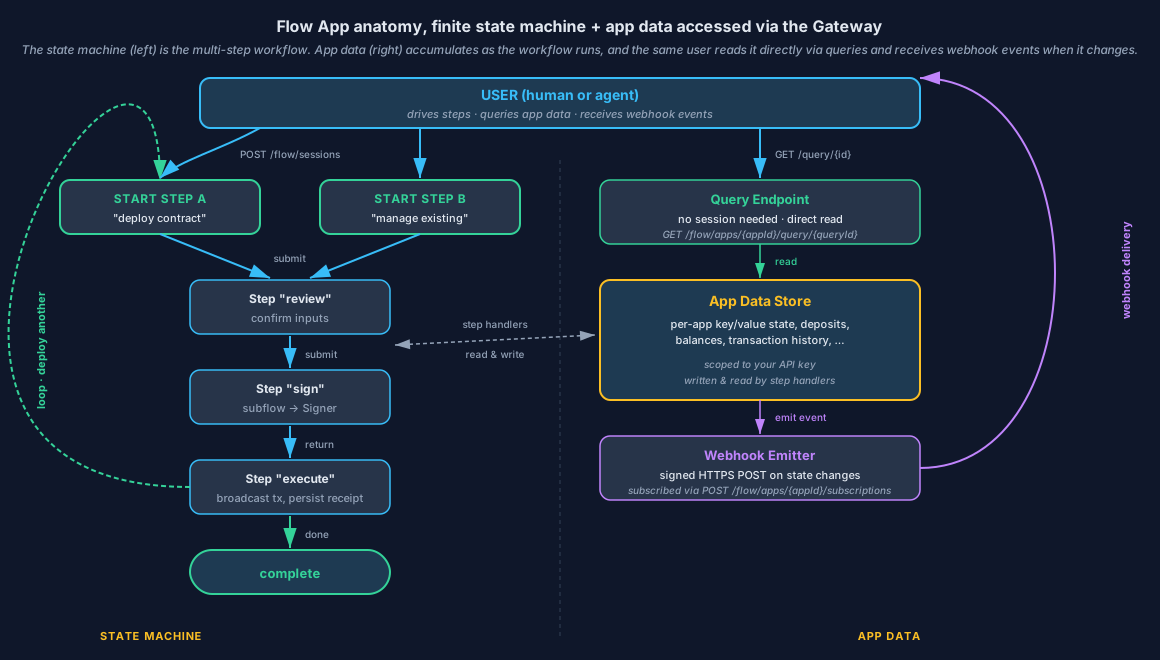
Multiple start steps converge on shared mid-steps, and loops are allowed, here execute returns to Start Step A to deploy another contract without starting a new session. App data accumulates as the workflow runs; the same user can read it directly via queries (no session needed) and receive webhook events when it changes.
Flow Apps are finite state machines
From a consumer's perspective a Flow App is a finite state machine that you traverse, one step at a time:
- Each step is a state with a typed
StepSpec, fields, options, and an action the user can submit. - A session is one traversal of that state machine. You're always sitting on exactly one step.
- Submitting a step drives a transition, the Flow App's handler decides which next StepSpec you receive (or marks the session as terminal). Transitions are encoded inside the app's submit handler; from your perspective every submit either lands you on the next StepSpec or terminates the session.
- Sessions terminate at one of two terminal states:
complete(the app finished successfully) orexpired(the session timed out before completion).
That structure is what lets clients build structured workflows without baking the workflow into the client code: the Quant Connect UI, an MCP-driven agent, and a custom backend integration all walk the same state machine; the app, not the client, owns the routing.
Multiple start steps
An app can declare multiple start steps (entry points). For example, a smart-contract-deployment app might have one start step for deploying a new contract and another for managing permissions on an existing deployment; an account-management app might have separate entry points for "open new account" and "manage existing accounts".
When you call POST /flow/sessions, pass startStepId in the request body to choose which entry point you want. Omit it to land on the app's default start step. The session response echoes the startStepId so you can confirm which entry you started on.
{
  "appId": "quant/smart-contract-deployment",
  "startStepId": "deploy"
}
Discover the available start steps from GET /flow/registry/apps/{appId} (the app's step catalogue tags entry-point steps).
Direct read calls (queries)
Alongside the state-machine, a Flow App can expose read-only queries for data that doesn't need a multi-step flow, balances, status checks, lookups. You call them outside any session:
GET /flow/apps/{appId}/query/{queryId}Use queries when the answer is a single read (e.g. "what's my current deposit balance?", "is this contract whitelisted?"); use a session when the workflow involves multiple decisions, signatures, or side effects.
Per-user data isolation (default)
By default, every Flow App scopes its app data to the authenticated user. The sessions you start, the queries you read, and the webhooks you subscribe to only see records that belong to your account — another integrator using the same Flow App can't see yours and you can't see theirs. Step handlers, queries, and webhook emission are all filtered by user identity at the Gateway, so this isolation holds whether the app is internal (embedded) or external (hosted elsewhere).
Apps that genuinely need to expose shared or cross-tenant data — a public price oracle, a shared whitelist registry, an aggregator across users — can opt resources out of the default and serve them to all callers. Cross-tenant exposure is explicit per resource at the app level; the safe default is full isolation, and a private / permissioned Flow App that doesn't declare any shared resources will only ever return per-user data.
This isolation is orthogonal to the app's visibility (who can call the app at all): visibility controls which users see this app in their registry; data isolation controls whose data you see once you're calling the app.
Everything goes through the Gateway
You never talk to a Flow App directly. All Flow App traffic goes through the Gateway, which is responsible for authentication, the Overledger Firewall, content filtering, payment gates, and rate limits.
| You call | The Gateway does |
|---|---|
POST /flow/sessions | Starts a new session for the given appId (optionally at a specific startStepId) and returns the first StepSpec. |
GET /flow/sessions/{sessionId}/steps/{stepId} | Re-renders a step (idempotent read). |
POST /flow/sessions/{sessionId}/steps/{stepId} | Submits user input and returns the next StepSpec, or marks the session complete. |
GET /flow/apps/{appId}/query/{queryId} | Runs a read-only query the app exposes (no session needed). |
Two attributes you'll see on every app
Every Flow App in the registry carries two attributes that affect how you discover and consume it.
| Attribute | Values | What it means for you |
|---|---|---|
appType | internal · external | How the app runs. internal apps are embedded in the Gateway, Quant builds and hosts them; today every shipped app is internal. external apps run as a separately-hosted service (a partner or customer deployment) that the Gateway calls over the network. Both kinds expose the same client-side surface, you call them through the Gateway in exactly the same way. |
visibility | public · permissioned · private | Who can call the app. public apps are listed for every user. permissioned apps are listed only for users the app's owner has explicitly granted. private apps are listed only for the owner. The Gateway filters GET /flow/registry/apps by visibility — you only see apps you're allowed to call. |
Both attributes are returned on each entry from GET /flow/registry/apps.
6.2 The Prepare-Sign-Execute pattern
Most Flow Apps that touch a chain follow the same three-phase pattern. We call it Prepare-Sign-Execute.
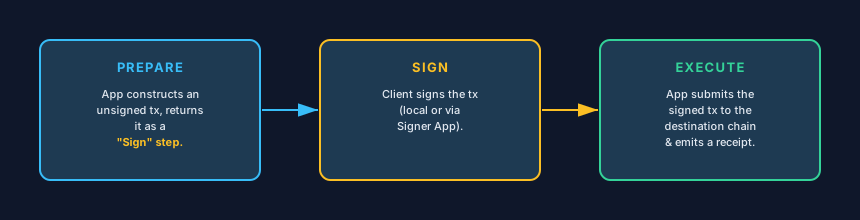
The three-phase transaction lifecycle in a Flow App: Prepare (construct an unsigned transaction), Sign (client or Signer App signs it), and Execute (broadcast to the destination chain and return a receipt).
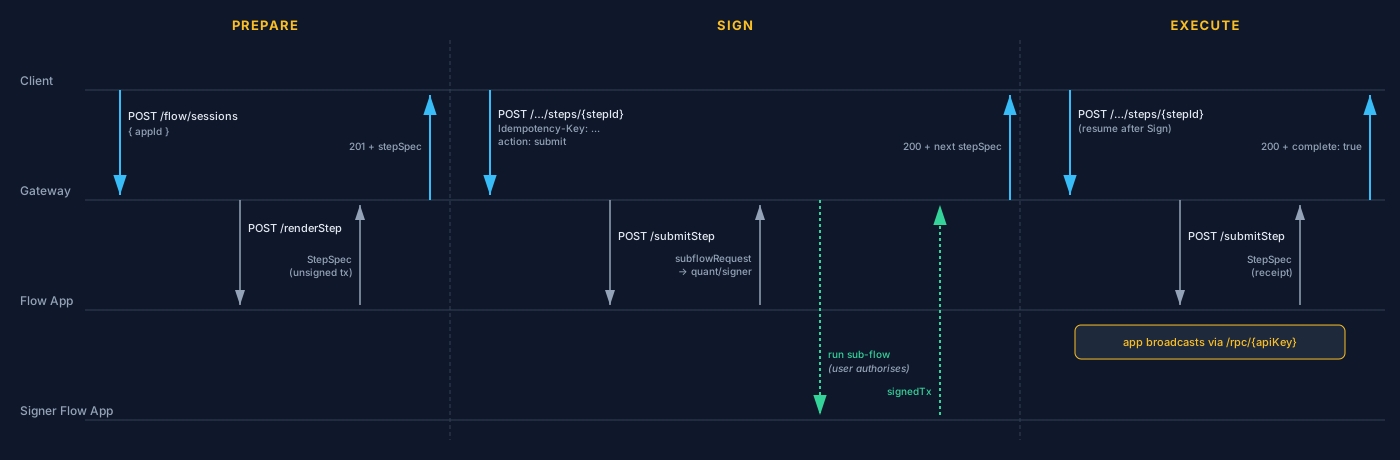
Three phases between Client, Gateway, Flow App, and Signer Flow App. The Sign phase hands off via a sub-flow; the Client never sees private-key material.
From your client's perspective, the pattern looks like this:
- Prepare. You start a session; the first
StepSpecdescribes the unsigned transaction the app has prepared (counterparty, amount, fee). Your screen renders these fields and surfaces asubmitaction. - Sign. When you submit, the Gateway routes the session into a sub-flow, typically the built-in Signer Flow App (section 6.8), which collects the signature. If you're signing locally instead, you sign with your own key material and the next step accepts the signed payload.
- Execute. The app broadcasts the signed transaction (over
/rpc/{apiKey}for Fusion Rollup or via Connectors for other DLTs) and returns a receipt step with the result.
The Gateway never sees your private keys.
Under the hood, the Sign hand-off
When a transaction-emitting Flow App reaches its Sign phase, its submitStep does not ask your client to sign directly. Instead, it returns a sub-flow request that points at the built-in Signer Flow App (fusion.signer), carrying two payload fields:
vars, the unsigned transaction expressed as string substitution variables (chainId,from,to,value,data,gasLimit,nonce, …).filter, the capability the signer should perform (signTx,signMessage, orsignTypedData), the expected signing address, and any chain hints.
The Gateway pushes a sub-flow frame and routes the session into the Signer Flow App, the single signing entry-point that every Flow App uses, regardless of where your keys live. What happens inside the Signer Flow App depends on where your signing-key material is held:
- You hold the keys (BYO signing, see chapter 7.2). The Signer can't produce the signature itself, so its step renders a typed
FieldType.Walletfield carrying the unsigned tx (vars), a wallet action (sign-transaction,sign,connect, orsend), and theexpectedAddress. Your client renderer is responsible for surfacing that field to a real signer:- In the Quant Connect UI, the
WalletFieldcomponent auto-detects the action and pops your connected wallet (e.g. MetaMask, WalletConnect, …). You approve in the wallet UI, signing happens in your wallet, and the signed bytes flow back to the Signer step. - In a direct-HTTPS / SDK client, your code reads the
Walletfield, hands the unsigned tx into whatever signer you've wired up (ethers, viem, a hardware wallet, your own KMS, …), and submits the resulting signed bytes back to the Signer step. The Wallet field arrives in the response body of your ownPOST /flow/sessions/{sessionId}/steps/{stepId}submission, the Signer does not push outbound to your service. - In an MCP host, the field exposes as an agent tool with signing-capability metadata; the host handles the prompt and the agent submits the signature back.
- In the Quant Connect UI, the
When the Signer step completes, the Gateway pops the sub-flow, resumes the caller's returnStep, and injects the signer output under state.signResult (typically { signature?, signedPayload?, txHash?, address, chainId, cancelled?, reason? }). The caller's Execute step then broadcasts signedPayload via eth_sendRawTransaction (or the equivalent native call on a non-EVM DLT) and returns a receipt.
Two invariants this design preserves:
- The unsigned transaction travels as plain substitution variables, never as a raw signable object the Gateway must reason about.
- The calling Flow App and the Gateway routing the sub-flow never see private keys. Key material is always under your control.
Info, IdempotencyEvery
POST /flow/sessions/{sessionId}/steps/{stepId}requires anIdempotency-Keyheader (any string, 1–256 chars). Submissions are cached per session, repeating the same key on the same session returns the cached response instead of re-executing. Use a fresh key for each genuine submission; reuse the previous key when retrying after a network failure.
6.3 How Flow Apps are consumed
The same StepSpec drives three consumption channels:
| Channel | Audience | How |
|---|---|---|
| Quant Connect UI | Human users in a browser | The UI consumes the StepSpec and renders fields, options, and actions as HTML. |
| MCP (Model Context Protocol) | AI agents in Claude Desktop, Cursor, IDE assistants | A standalone MCP adapter (Quant-supplied or third-party) sits between the MCP client and the Gateway: it discovers each app's tool catalogue via GET /agent/tools, then exposes those tools to the agent. Each step exposes as an MCP tool (flow_render_step, flow_submit_step, …) with agent metadata describing risk level, idempotency, and emitted events. |
| Direct HTTPS | Client services, backend integrations, CI/CD scripts, automated treasury, custom internal UIs | Your service calls POST /flow/sessions, POST /flow/sessions/{sessionId}/steps/{stepId}, and GET /flow/apps/{appId}/query/{queryId} directly. The StepSpec drives the next call programmatically, no UI rendering, no MCP host, just walk the state machine via HTTP. This is the service-to-service / automation channel. |
Because all three channels consume the same step description, human, agent, and service flows stay synchronized. The same Flow App works in any channel without any per-channel logic on your part.
A step's agent field gives the agent extra hints, risk class, free-text guidance, expected side effects, that the human UI and most automated service integrations do not need.
6.4 The App Registry
The App Registry is the catalogue of Flow Apps available to your account.
| Endpoint | Purpose |
|---|---|
GET /flow/registry/apps | List apps available to your account. Returns { data: [...], pagination }. |
GET /flow/registry/apps/components | Static UI components the apps may declare. |
GET /flow/registry/apps/{appId} | Versions, step catalogue, declared queries, agent metadata for one app. |
The registry is filtered by visibility against the authenticated user: you see every public app, every permissioned app you've been granted access to, and every private app you own. Each entry in the response carries its appType (internal / external) and visibility so you can tell at a glance whether an app is Quant-built-and-embedded or a separately-hosted partner deployment.
Version lifecycle
Each version of a Flow App carries a status from the VersionStatus enum:
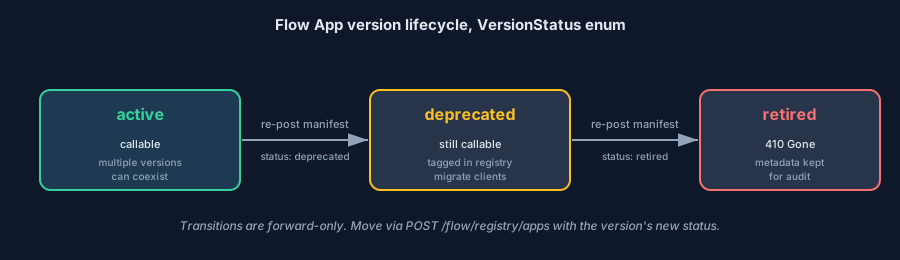
Transitions are forward-only.
active, visible and callable. Multipleactiveversions of the same app can coexist; clients pick a specificversionstring or omit it to get the latest active.deprecated, still callable but tagged in the registry response so clients can migrate.retired, calls return410 Gone(urn:fusion:error:gone). The Gateway keeps the historical metadata for audit.
Pin versions explicitly in production traffic; default to latest only in test environments. When an app you depend on moves to deprecated, you'll see the tag on the registry response, that's your cue to test against the newer version and migrate.
6.5 Payments, x402 settlement gates
Flow Apps can gate individual actions behind a payment. The protocol used is x402, payment metadata returned with HTTP 402, implemented on EVM via Uniswap's Permit2 for on-chain settlement.
The app chooses the token. Each gated action declares its own token, amount, and recipient in the X402Descriptor it returns. Apps are free to price in QNT, a stablecoin (USDC, USDT, …), or any other ERC-20 supported on the chain the descriptor targets. Different actions within the same app, or different versions of the same app, can price in different tokens.
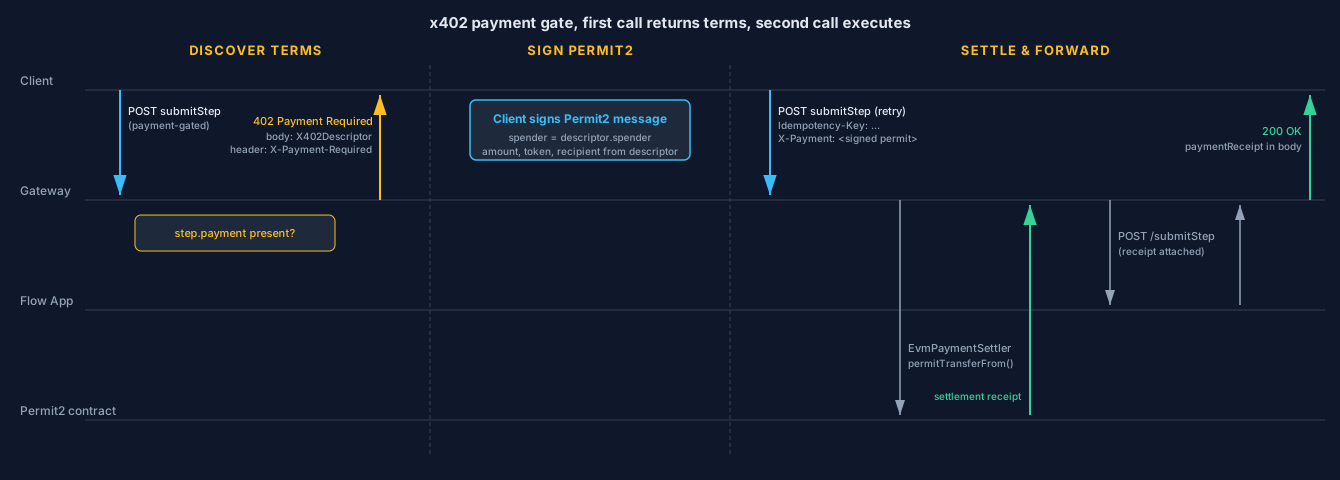
Two round-trips: the first call discovers the price, the second pays. Permit2 means no prior allowance transaction is needed.
How it works
- You submit a step whose action is payment-gated.
- The Gateway returns
402 Payment Requiredwith anX402Descriptorbody describing the payment (token, amount, recipient, spender, etc.), the same descriptor is also base64-encoded in theX-Payment-Requiredresponse header. - You sign a Permit2 message authorising the payment (using the
spenderand amounts from the descriptor). - You re-submit the same step, attaching the signed permit in the
X-Paymentrequest header. - The Gateway runs the on-chain settlement, then forwards the action to the Flow App.
Errors
All payment-related errors come back as ProblemDetails (since they're on /flow/* routes).
| HTTP | When | Response shape |
|---|---|---|
402 | First call to a gated action. | Body: an X402Descriptor JSON object. Header X-Payment-Required has the same descriptor base64-encoded. |
400 | The submitted Permit2 proof is malformed, mismatched, or expired. | ProblemDetails with type: urn:fusion:error:bad-request. |
502 | The settler contract reverted the on-chain settle. | ProblemDetails with type: urn:fusion:error:bad-gateway. |
The detail field on a 400 / 502 carries the underlying validation or execution reason.
6.6 Content filtering
Every step the Gateway returns has been through platform-level content filtering. Banned categories include prompt injection, credential harvesting, HTML/script injection, Unicode attack patterns, and profanity. A blocked render never reaches your client, instead you get a ProblemDetails with HTTP 502 and type: urn:fusion:error:bad-gateway, and the detail identifies the field path and matched pattern category.
You don't need to do anything to opt in; filtering is on by default.
6.7 Agent integration (MCP)
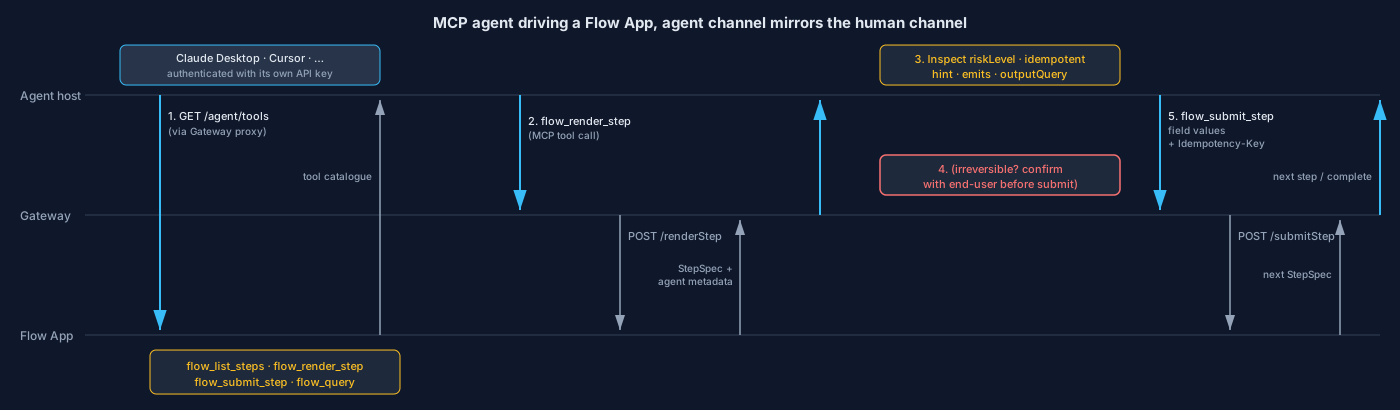
Same StepSpecs as the human channel. Agent metadata (riskLevel, idempotent, emits) tells the agent when to pause for user consent.
To integrate Overledger Flow Apps into an agent client (Claude Desktop, Cursor, your own MCP host) the architecture is:
MCP client (Claude Desktop / Cursor / …)
    ↕  stdio
MCP adapter           ← standalone subprocess the MCP client launches
    ↕  HTTPS
Overledger Gateway
    ↕
Flow App
The MCP adapter is any MCP-compatible stdio server that knows the Flow App tool catalogue. Quant publishes one for partner use; any equivalent third-party or in-house adapter works the same way, the only contract is "speak MCP on stdio, call the Gateway over HTTPS." There are two pieces to set up.
Discovering tools, GET /agent/tools
GET /agent/toolsEvery Flow App auto-exposes a GET /agent/tools endpoint (via the SDK). It returns MCP-compatible tool definitions derived from the app's StepSpecs, one tool per step, plus the read-only queries the app declares. These tools are what the adapter publishes to the MCP client. You don't usually call /agent/tools directly, the adapter does it on your behalf at startup.
The default tool catalogue:
| Tool | Purpose |
|---|---|
flow_list_steps | Enumerate steps for an app. |
flow_render_step | Produce a StepSpec for a given step. |
flow_submit_step | Submit input. |
flow_query | Run a declared read-only query. |
Wiring the MCP adapter
The adapter is a standalone process that translates MCP stdio calls into HTTP requests against the Gateway. You configure your MCP client to launch it. In Claude Desktop, for example, that means adding an entry to claude_desktop_config.json:
{
  "mcpServers": {
    "overledger": {
      "command": "your-mcp-adapter",
      "env": {
        "OVERLEDGER_URL": "https://fusion-rollup.quant.dev",
        "API_KEY": "<your api key>"
      }
    }
  }
}
Replace your-mcp-adapter with the binary or npx invocation for whichever adapter you're using, Quant-supplied or your own. The MCP client launches the subprocess on startup, the subprocess fetches GET /agent/tools for each registered Flow App, and the resulting tools appear as callable actions in the agent UI.
Agent metadata on each step
Each step's agent metadata block (AgentMeta in the spec) tells the agent how to handle it:
riskLevel, one ofsafe,caution,irreversible. Agents are expected to seek explicit user consent forirreversiblesteps.idempotent, whether re-running has side effects.emits, webhook event type IDs the step may emit (so the agent can subscribe).hint, LLM-optimised description of the step's purpose.outputQuery, the query ID an agent can call to read the resulting state after the step.
Agents authenticate to the Gateway with their own API key passed through the MCP server's environment, see the security note in chapter 3.5 about scoping agent keys narrowly.
6.8 Available apps
The Flow App catalogue is intentionally not enumerated in these docs — Quant ships new first-party apps and partners register their own apps on an ongoing basis, so any static list would be out of date almost immediately. Discover what's available for your account through one of two channels:
- Programmatically,
GET /flow/registry/appsreturns every app your account can see, filtered by App visibility (public,permissionedyou've been granted, andprivateapps you own). Filter bycategory,appType, orvisibilityvia query parameters. See chapter 4 andopenapi/overledger.yamlfor the full request and response shapes. - Through Quant Connect, the same registry is browsable in the Quant Connect UI, with descriptions, categories, version status, and a "launch" action that opens the app's first step inline.
Each registered app carries metadata that both channels surface:
| Field | What it tells you |
|---|---|
appId · version | The identifier and the version you'd address in API calls (omit version to resolve the latest active). |
displayName · description | Human-readable name and a short description of what the app does. |
categories | Tags such as signing, bridge, governance, deployment, handy for filtering or grouping in your UI. |
appType · visibility | internal vs external (where it's hosted) and public vs permissioned vs private (who can see it). |
versionStatus | active, deprecated, or retired, see the version lifecycle. |
owner | The account that registered the app (Quant for first-party apps, your account team or a partner for everything else). |
Whatever you discover, you drive it through the same /flow/sessions endpoints described earlier in this chapter, every app exposes the same client surface regardless of who built it or where it's hosted.
6.9 Webhooks & events
Flow Apps emit events. Your services subscribe by eventType and receive HTTP POST callbacks signed with HMAC-SHA256. This section covers what events fire, how to subscribe, the delivery format, signature verification, and retry semantics.
What events fire
Standard Flow App events:
| Event type | When it fires |
|---|---|
session.started | A new session has been created (right after POST /flow/sessions). |
step.submitted | A step has been submitted by the client. |
session.completed | A session has reached the complete terminal state. |
session.expired | A session has timed out. |
payment.settled | An x402 payment gate has been satisfied (the on-chain settlement succeeded). |
Apps may also declare their own custom event types, for example smart-contract-deployment.contract.deployed from the Smart Contract Deployment app, or signer.signature.requested from the Signer. The emits field on each step's agent metadata lists the event type IDs that step may emit; the App Registry returns these alongside the step catalogue.
Subscribing
| Endpoint | Purpose |
|---|---|
POST /flow/apps/{appId}/subscriptions | Create a subscription. |
DELETE /flow/apps/{appId}/subscriptions/{subscriptionId} | Cancel an existing subscription. |
GET /flow/apps/{appId}/events | Tail recent events for debugging, does not deliver to subscribers. |
A subscription request carries three required fields:
| Field | Constraints | What it does |
|---|---|---|
eventType | string, pattern ^[a-zA-Z0-9._-]+$, 1–100 chars | The event type you want to receive. One subscription = one event type; subscribe multiple times for multiple types. |
targetUrl | HTTPS URL, must not resolve to a private or loopback IP | Where the Gateway POSTs the event to. Private-IP resolution is rejected at subscription time (SSRF protection). |
secret | string, minimum 16 characters | Shared secret used to sign every callback. You generate it and store it. The Gateway never returns it again after subscription creation. |
Delivery format
Each delivery is an HTTPS POST to your targetUrl with a JSON body matching the WebhookEvent schema:
{
  "eventId":   "evt_…",
  "eventType": "session.completed",
  "sessionId": "sess_…",
  "payload":   { /* event-type-specific shape */ },
  "status":    "pending",
  "createdAt": "2026-03-15T12:34:56.000Z"
}
payload is event-type-specific, for payment.settled it includes the settlement receipt; for step.submitted it includes the step ID and the submitted field values; etc. The shape is documented under each app in the registry.
Every delivery also carries an HMAC-SHA256 signature header so you can verify the payload came from the Gateway and wasn't tampered with in transit. Compute the signature as hex(HMAC_SHA256(secret, rawBody)) and compare in constant time.
// Node.js handler, verifies the signature before processing the event
import crypto from "node:crypto";

function verify(rawBody, headerSig, secret) {
  const expected = crypto.createHmac("sha256", secret).update(rawBody).digest("hex");
  return crypto.timingSafeEqual(Buffer.from(expected), Buffer.from(headerSig));
}
Warning, Always verify before actingA handler that doesn't check the HMAC signature can be replayed or spoofed by anyone who knows the URL. Verify on every delivery, and rotate the
secretif you suspect leakage (cancel + re-subscribe with a new secret).
Reliability
- At-least-once delivery. The same
eventIdmay be delivered more than once. Make your handler idempotent, keyed oneventId, persist the fact that you've processed it before doing irreversible side effects. - Exponential backoff. Failed deliveries (non-2xx response, timeout, network error) retry with exponential backoff. A delivery is marked
failedafter the retry budget is exhausted. - Per-delivery status. Each delivery record carries one of three statuses:
pending(queued or in flight),delivered(your endpoint returned 2xx),failed(retry budget exhausted). Inspect delivery history viaGET /flow/apps/{appId}/events. - Receiver expectations. Return 2xx within 5 seconds. Slow handlers cause unnecessary retries and degrade the queue for other subscribers; offload work to a background worker if you can't respond in time.
Updated 4 months ago