
Connectors
Audience: Anyone calling non-Fusion DLTs through Overledger; operators registering their own nodes. Reading time: ~10 minutes. Prerequisites: Chapter 4: Overledger Gateway, and the Connectors discussion in section 1.3 Core concepts. You'll learn: The two onboarding paths (self-serve vs managed engagement), the DLT families available under each path, how to register a node from an approved provider, the multi-DLT RPC endpoint, and the network model.
Connectors are the part of the Overledger Gateway that speak the native RPC of each DLT. From a developer's perspective they look like a single multi-DLT RPC endpoint; behind that endpoint each DLT family has its own checker, load balancer, and node pool.
Overledger ships Connectors in two forms, as introduced in section 1.3:
- Self-serve Connectors for public, permissionless DLT families. Your account can register a node and reach the network through the API in minutes, with no account-team involvement. The full list is in section 5.1.
- Managed-engagement Connectors for permissioned, consortium, or otherwise-gated networks where membership and node identity matter (e.g. Fabric, Corda, Canton, Oracle Blockchain Platform, Google Universal Ledger, Hyperledger Paladin,...) as well as public DLTs not yet connected via the self-serve route (e.g. XRPL, Stellar, Bitcoin). These are integrated through a project engagement with Quant's team. The full list and rationale is in section 5.3.
A separate Fusion Connector handles traffic destined for the Fusion Rollup itself, see chapter 8.
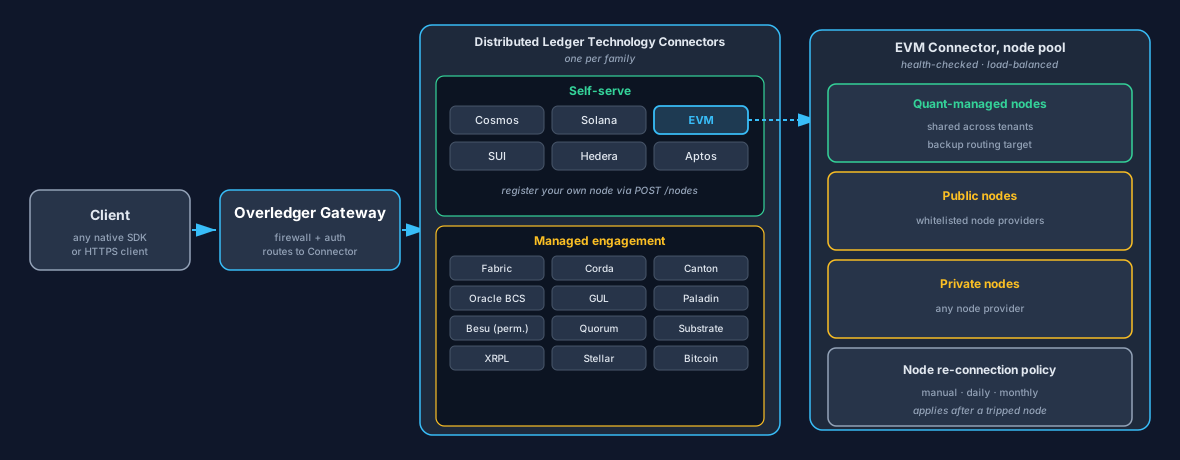
Two views in one diagram. Centre: the Connector taxonomy, the six current self-serve families on top and the engagement families below. Path: a single call travels Client → Overledger Gateway → the chosen Connector (EVM is shown highlighted) → a healthy node in that Connector's pool. The pool blends Quant-managed nodes (the backup routing target) users Public nodes (from whitelisted node providers) and Private nodes (from any node provider but only accessible to the user who added it); if a node trips its limit, the node re-connection policy (manual / daily / monthly) controls when it becomes routable again.
This chapter covers (a) what's supported today under each onboarding form, (b) how to add a node or a whole new network, and (c) the multi-DLT RPC API. The full machine-readable contract is in openapi/overledger-proxy.yaml.
5.1 Self-serve DLT families
Six DLT families are available for self-serve onboarding today, you can register a node and call the network without an account-team conversation:
| DLT | Notes |
|---|---|
| EVM | Covers every EVM-compatible chain (Ethereum, Polygon, Arbitrum, Avalanche, …). |
| Solana | Standard Solana JSON-RPC. |
| Cosmos | Tendermint-based chains. |
| SUI | Mysten Labs RPC. |
| Hedera | EVM-compatible mirror. |
| Aptos | Aptos full-node REST. |
Across these six DLT families, an increasing number of DLT networks are available. Run GET /networks to retrieve the live list.
A DLT family is considered eligible for self-serve if (a) its nodes expose RPC or REST over HTTPS, (b) the RPC requires no security factor beyond an API key, and (c) node identity does not matter to other tenants (so a pool of equivalent nodes can be load-balanced safely). DLTs that need consortium membership, MSP enrolment, channel agreement, notary trust, privacy-group setup, or any other identity-bound configuration are onboarded through the engagement path in section 5.3 instead. Adding a brand-new DLT family to either path is described in section 5.4.
5.2 Self-serve networks
For networks where it does not matter which node a client connects to, i.e. public permissionless networks, Quant Connect lets you register a managed-provider node URL via a single UI form and Overledger lets you register a managed-provider node URL via a single API call. The network then becomes immediately reachable through the Overledger Gateway. This works for two cases:
- Existing supported network, Overledger already lists the network (e.g. Ethereum Sepolia, Polygon Amoy). Your node joins the existing load-balancing pool alongside Quant-operated and other customer-registered nodes.
- New network within a supported DLT family, the network is not yet listed by Overledger, but its DLT family is one Overledger already supports for self-serve (EVM, Solana, Cosmos, SUI, Hedera, Aptos). The first
POST /nodescall registers both the network and your node for it. This new network will then be available for Overledger users.
Cases 1 and 2 use the same POST /nodes call. The Gateway picks between them based on whether it already recognises the network identifier (and other related identifying information).
For either flow, when adding a new node, the user selects whether this node should be public or private. If public is selected then the user can only add nodes from whitelisted providers. If private is selected then the user can add nodes from any domain.
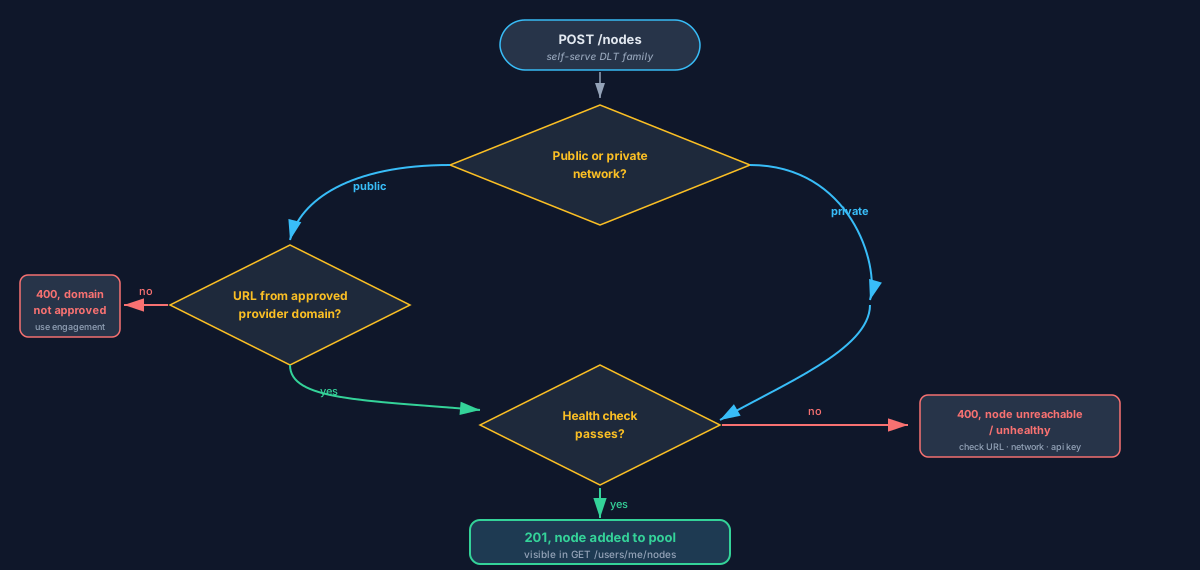
This is the self-serve flow only, engagement networks (section 5.3) do not use POST /nodes.
Public node vs private node, constraints at a glance
The public / private choice you make on every POST /nodes call is per-node, and it applies whether you're hitting case 1 (existing network) or case 2 (new network within a supported DLT family) above.
| Public node | Private node | |
|---|---|---|
| Who else can use it | Any tenant with access to the network, the node joins the shared load-balancing pool for that network. | Only your API key, the node is scoped to your account. |
| Allowed node URL | One of the whitelisted-provider domains listed below. | Any reachable HTTPS URL, self-hosted, custom-provider, on your own infrastructure, anywhere. |
| Provider API key in URL | Required, embedded in the URL path (the Gateway forwards the URL as-is), not a header. | Optional, your endpoint's auth model is your concern. |
| Health check at registration | Required (section 5.1). | Required (section 5.1). |
| Can be promoted later | n/a, already shared. | You would have to delete the node and re-add it as a public one. |
Approved provider domains (public networks)
When you're adding a node to a public network the node URL must come from one of the following managed-provider domains so the operator pool stays auditable:
alchemy.com, infura.io, quiknode.pro, chainstack.com, getblock.io, blockdaemon.com, ankr.com
Add a node via the Quant Connect UI
- Open Networks → Add a node.
- Pick the DLT family and the network name.
- Paste the provider URL.
- The Gateway runs a health check using the DLT's standard validation from section 5.1 and, on success, adds the node to the network's load-balancing pool.
5.3 Engagement networks
For networks where node identity matters, typically permissioned DLTs used by regulated consortia and operator-gated public chains, Overledger does not self-serve currently. These networks require a project engagement to integrate, because membership, MSPs, sub-domains, channel policies, notary trust, privacy groups, or operator agreements have to be set up before the Connector can be wired up.
DLT families Quant already has Connectors built and ready for, via engagement:
| Network / family | Form | Why engagement is needed |
|---|---|---|
| Hyperledger Fabric | Permissioned consortium | Channel membership, MSP enrolment, and chaincode endorsement policies must be agreed up front. Per-channel onboarding. |
| R3 Corda | Permissioned consortium | Distinct interaction model (via Cordapps); requires per-counterparty trust setup and notary agreement. |
| Canton Network | Permissioned (Daml-based) | Privacy contracts and sub-domain configuration must be aligned with each participant. |
| Oracle Blockchain Platform | Permissioned (Fabric variant) | Built on Hyperledger Fabric, hosted by Oracle Cloud, Quant integrates against the operator-supplied gateway URL and tenant credentials. |
| Google Universal Ledger | Permissioned (Google-operated) | Google-operated permissioned ledger; Quant wires the Connector against the customer's Google project and operator-supplied endpoint. |
| Hyperledger Paladin | Permissioned (programmable privacy on EVM) | Privacy-group and node-identity configuration must be agreed between the participating parties before the Connector can be wired up. |
| Hyperledger Besu (permissioned) | Permissioned EVM | Used in regulated EVM deployments. The Connector needs the consortium's configuration. |
| Quorum / GoQuorum | Permissioned EVM | Privacy-manager configuration (Tessera) and consortium membership are part of onboarding. |
| Substrate-based chains | Polkadot SDK / parachains | Per-chain runtime types and custom pallets have to be wired into the Connector. |
| Ripple / XRP Ledger (XRPL) | Public, but admin-gated | Public chain, but Overledger's XRPL integration is sized per use case (rate limits, partner agreements). |
| Stellar | Public, federation-style | Public Stellar can be added on request. |
| Bitcoin | Public | Supported on request. Bitcoin has no smart contracts, so it's currently low-priority, let your account team know if you need it. |
This list is representative, not exhaustive, more Connectors are continuously being built; if your DLT exposes RPC (or a documented REST equivalent) over HTTP(S) and authenticates with a bearer or API-key factor, Quant can normally onboard it. The expected effort for a brand-new DLT family is in section 5.4.
To request an engagement: contact [email protected] with a short description of the network, the participants you want to reach, and the use case.
5.4 Adding a new DLT family
If the DLT family you need is in neither section 5.1 nor section 5.3, the engineering cost to add it is typically:
| Work | Time |
|---|---|
| Implement a DLT checker (health validation + chain identifer lookup) | ~2 days |
| Add per-DLT handling in any apps that need to consume it | ~1 day per app |
Pre-requisites for a new DLT family to be eligible at all:
- Nodes expose RPC (or a documented REST equivalent) over HTTP(S).
- The chain has a notion of chain identity that the checker can verify.
Whether a new DLT family then lands as self-serve or engagement-only depends on whether node identity matters to other tenants (the gating criterion in section 5.1).
To request a new DLT family: contact [email protected].
5.5 Multi-DLT RPC endpoint
When the Overledger Gateway receives a request to interact with a particular DLT network, the gateway does the following:
- Authenticates by the
{apiKey}in the URL. - Checks the Overledger Firewall (Connector layer), does this API key have permission to reach this DLT and network?
- Picks a healthy node from the network's pool (your own nodes plus other user nodes plus shared Quant nodes), see Node selection below.
- Forwards the payload, returns the native response unchanged.
Node selection. The pick in step 3 is not random. Several inputs feed the routing decision:
- Your own private nodes for the requested network, if you have any registered against the network, they are preferred over the shared pool.
- Rolling latency measured per node, slower nodes are deprioritised.
- Rolling error rate measured per node, nodes that have recently returned errors are deprioritised, and a node that has tripped its limit drops out of rotation until the node re-connection policy (manual / daily / monthly) allows it back in.
- QNT staked against each node, for nodes on public DLT networks, the amount of QNT staked against the node is another factor.
Quant-managed shared nodes act as the backup routing target when no higher-scoring candidate is available.
Method allowlist. A set of administrative or destructive RPC methods are blocked at the Gateway across all DLTs (e.g. personal_*, admin_*, txpool_* on EVM, and DLT-specific equivalents). The exact per-DLT list is defined by the Connector and is subject to change. Submitting a blocked method returns HTTP 403 with a StandardError body.
5.6 Network model
Every network returned by GET /networks (and GET /networks/fusion) carries the following properties:
| Property | Values | Meaning |
|---|---|---|
networkId | string | Unique identifier you pass as {network} in the multi-DLT RPC URL. |
name | string | Human-readable display name (e.g. "Ethereum Sepolia"). |
type | Self-serve: EVM, SOLANA, COSMOS, SUI, HEDERA, APTOS. Engagement Connectors may extend this enum on the deployments where they are wired up, check the live values returned by GET /networks on that environment. | DLT family. |
environment | mainnet, testnet, devnet | Stage. |
visibility | public, permissioned, private | Who can call it. public, any API key. permissioned, keys explicitly granted by the network owner. private, only the network owner. |
status | active, paused, deprecated | paused networks accept reads but reject writes. deprecated networks are kept for history only. |
capacity | PROVISIONED, ENHANCED, SCALED | Throughput level. Higher tiers automatically occur as more nodes are added to those networks. |
isFusion | boolean | true only on the Fusion Rollup entry, false for every connected DLT. |
rpc | string | RPC URL the Gateway exposes for this network. The canonical multi-DLT form is in section 5.5. |
Updated about 18 hours ago