
Overview
Audience: Everyone, read once before going anywhere else. Reading time: ~8 minutes. Prerequisites: None. You'll learn: The stack-level architecture, the five core concepts (Gateway, Connectors, Orchestration, Overledger Firewall, Fusion Rollup), and the glossary used throughout the rest of the docs.
1.1 What is Overledger
Overledger is Quant's multi-DLT platform for building applications that span more than one blockchain. It gives developers a single set of credentials, a single API surface, and a single execution environment that reaches across public networks (Ethereum, Polygon, Solana, …), public permissioned networks (consortium chains with public read access), and private permissioned networks (consortium chains).
Architecturally, Overledger is built on three foundational components:
- A Gateway that authenticates clients, routes requests, and orchestrates higher-level workflows.
- A set of Connectors that abstract individual DLT RPC protocols behind a common interface.
- A Multi-ledger rollup (the Fusion Rollup) that anchors to multiple blockchains simultaneously, providing one EVM-compatible execution environment with deposits, withdrawals, and cross-chain messaging across every connected L1.
Built on top of those foundations are the cross-cutting features: Flow Applications (the workflow plane), the Overledger and Fusion Firewall (policy enforcement), content filtering, payment gates, and per-user data isolation.
Flow Applications are composable, multi-step business workflows that any client (human user, AI agent, or client service) can drive through the Gateway. Apps can be first-party (Quant-built, embedded in the Gateway) or externally hosted by customers and partners and registered with the Gateway. Both kinds expose the same client surface and inherit the platform's authentication, firewall, content filtering, and per-user data isolation.
1.2 The Overledger stack at a glance
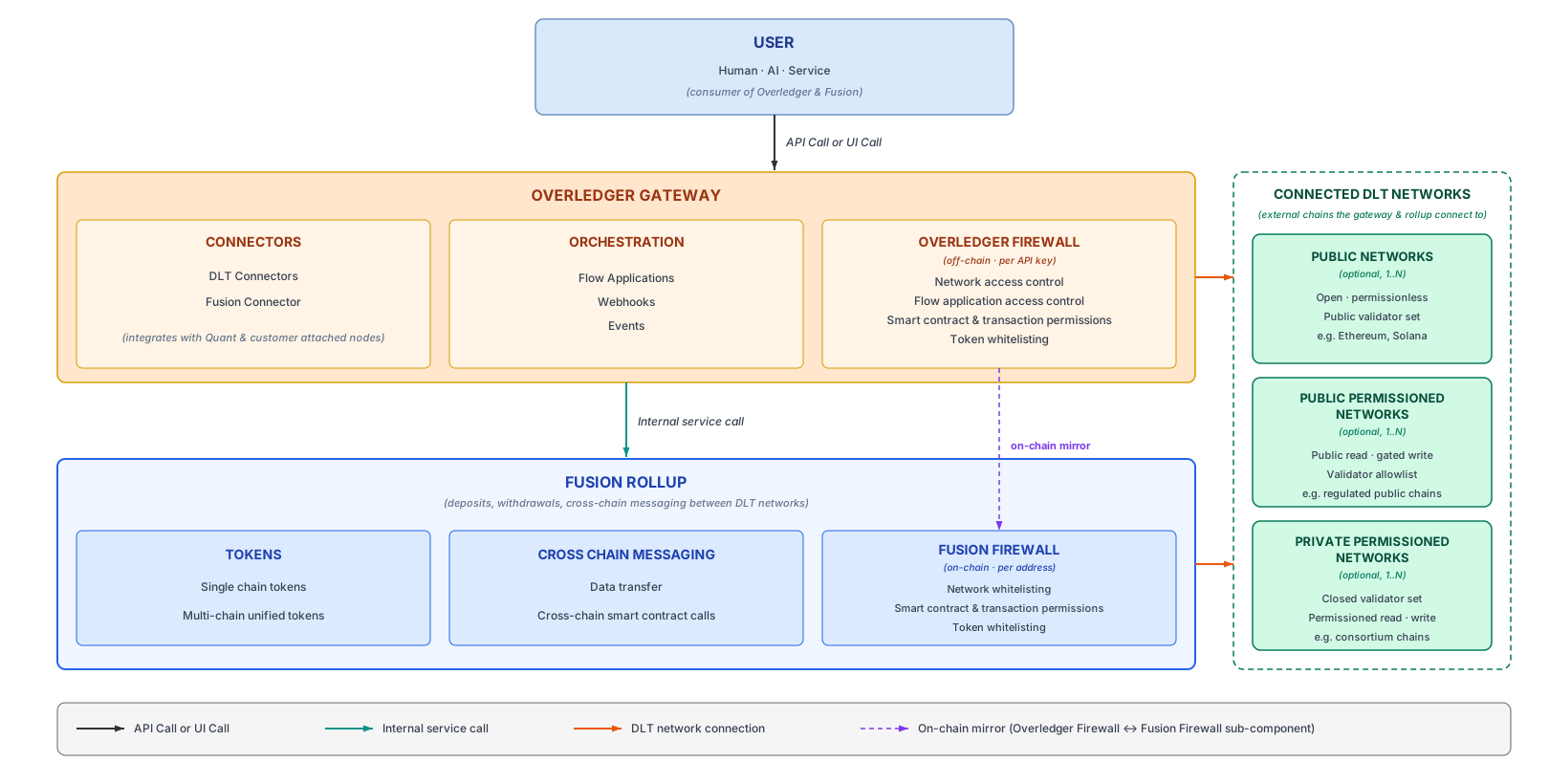
End-to-end request flow from user through the Overledger Gateway (connectors, orchestration, off-chain firewall) and Fusion Rollup (tokens, cross-chain messaging, on-chain firewall) to connected DLT networks.
Reading the diagram top-to-bottom:
| Layer | What it does |
|---|---|
| User | Human, AI agent, or service, drives the system via API or UI. |
| Overledger Gateway | Single entry point. Authenticates, routes traffic, hosts Orchestration, fronts the Fusion Rollup. Has three sub-blocks: Connectors, Orchestration, Overledger Firewall. |
| ↳ Connectors | DLT Connectors (for external chains) and the Fusion Connector (for the Fusion Rollup). |
| ↳ Orchestration | Flow Applications, webhooks, and events. The workflow plane. |
| ↳ Overledger Firewall (off-chain · umbrella) | Off-chain policy enforcement against the authenticated caller, applied across every DLT the Gateway reaches and across every Flow App the Gateway has connected. Additional smart contract, transaction and token whitelist permissions are currently Fusion Rollup specific and implemented by the Fusion Firewall sub-component. The policies of the Fusion Firewall are mirrored on-chain inside the rollup and on each connected L1. |
| Fusion Rollup | Optimistic rollup anchored to multiple L1s. Has three sub-blocks: Tokens, Cross Chain Messaging, Fusion Firewall (sub-component). |
| ↳ Tokens | Single-chain tokens and multi-chain unified tokens. |
| ↳ Cross Chain Messaging | Data transfer and cross-chain smart contract calls between connected DLT networks. |
| ↳ Fusion Firewall (on-chain · Fusion Firewall sub-component) | The on-chain enforcement of the same three policy categories, encoded in Fusion-specific contracts on the rollup and on each connected L1, so the rules survive even if the Gateway were bypassed. |
| DLT Networks | The external chains the Gateway and Rollup connect to. Three categories, Public, Public Permissioned, Private Permissioned. The Rollup connects to a subset of these networks. |
1.3 Core concepts
Overledger Gateway
Overledger handles authentication, routing to either Connectors or the Fusion Rollup, rate limiting, observability, and orchestration of Flow Applications. The Gateway API is documented in chapter 4.
Connectors
Connectors are the DLT-protocol-aware components behind the Gateway. There is one Connector per DLT family (e.g. EVM, Hyperledger Fabric, Solana, Canton Network, SUI, Corda, etc). Each Connector integrates with a pool of nodes for its DLT family: Quant-operated nodes that ship by default, plus customer-attached nodes that your account can register. See chapter 5 for the two onboarding paths:
-
Self-serve: you can instantly register a DLT node for one of the DLTs Overledger supports for self-serve; and
-
Managed engagement: you work with Quant's team to onboard a private / consortium network (e.g. Corda, Canton, Fabric) or to add a brand-new DLT family Quant doesn't yet support.
Connectors validate node health, route RPC calls to a healthy backend node, and translate responses into a consistent shape. A separate Fusion Connector handles traffic destined for the Fusion Rollup. Connectors are documented in chapter 5.
Orchestration, Flow Applications
A Flow Application is a stateful, multi-step workflow hosted by the Gateway. Quant ships a catalogue of first-party Flow Apps (e.g. signer, smart contract deployer, cross-chain messenger, …) that you can drive from your client; each step is a typed description of a screen (fields, options, actions) that the Gateway hands back. The client renders the step (in the Quant Connect UI for humans, or as MCP tools for agents), collects input, and submits it back.
Flow Apps don't have to be Quant-built. Customers and partners can host their own Flow Apps externally, stand up an HTTPS service that implements the Flow App contract, register its URL with the Gateway, and your bespoke regulated workflow becomes a first-class app in Overledger. External apps go through exactly the same path as internal ones: authentication, Overledger Firewall, content filtering, payment gates, per-user data isolation, MCP rendering for agents, webhook emission, and the Gateway being the single integration point.
Flow Applications are documented in chapter 6.
Overledger Firewall
The Overledger Firewall is the policy layer that decides, for every request entering Overledger, whether the caller can do what it's trying to do. It has two layers:
- The Connector layer (Overledger-wide, off-chain, the umbrella) runs inside the Gateway and enforces against the authenticated user. It applies to every public or permissioned DLT network that the Gateway reaches, and to the Flow Application plane that runs above them. This is what decides whether the caller can send RPC to a given DLT and network, whether they can see and call a given Flow App, and whether they can drive a given session.
- The Rollup layer (Fusion Firewall sub-component) runs off-chain but also on-chain inside Fusion-specific contracts on the Fusion Rollup itself and on the Rollup-connected L1 chains. It enforces against on-chain addresses, deciding which addresses can call which smart contracts, send which cross-chain messages, and bridge which tokens. The link to user accounts is indirect: Overledger maintains the binding between each user and their authorised on-chain address(es), so policies expressed against a user translate into on-chain address allowlists.
Both layers are documented in chapter 9.
Fusion Rollup
Fusion is the world's first multi-ledger rollup, we call it Layer 2.5 because where a conventional Layer 2 anchors to a single Layer 1, Fusion anchors to N L1s simultaneously. A single smart contract deployed on the Fusion Rollup can therefore:
- Receive deposits from, and settle withdrawals to, any of the connected DLT networks.
- Receive cross-chain messages from transactions and smart contracts on any of the connected DLT networks. For example, a user transaction on (say) Ethereum and a smart-contract event on (say) Polygon can both drive the same Rollup contract through the cross-domain messenger.
- Send cross-chain calls back out, the same Rollup contract can dispatch messages and transactions to smart contracts on any of the connected DLT networks.
The Rollup is documented in chapter 8.
Quant Connect UI
The Quant Connect UI is the Quant-hosted web interface that renders Gateway resources and Flow Applications for human users. It is the human channel of Overledger.
The parallel agent channel uses the Model Context Protocol (MCP): an MCP-compatible stdio adapter (Quant-supplied or third-party) is launched by an MCP host (Claude Desktop, Cursor, your own MCP client). The adapter discovers each Flow App's tool catalogue via the Gateway's GET /agent/tools endpoint and exposes the steps as callable MCP tools.
The third channel is programmatic: client services (backend integrations, CI/CD scripts, automated treasury operations, any service-to-service code) call the Gateway HTTPS API directly and walk the Flow App state machine programmatically rather than rendering it. Same authentication, same step specifications, same Overledger Firewall, just no UI or MCP host in the middle.
All three channels, Quant Connect UI, MCP, and direct API, consume the same Gateway APIs and the same Flow Application step specifications.
1.4 Glossary
| Term | Meaning |
|---|---|
| API key | A self-managed credential (fk_<keyId>.<secret>) minted by an authenticated user via the REST API. Used to authenticate RPC and REST requests. See chapter 3. |
| Connector | Component of the Gateway that handles requests for a specific DLT family. |
| DLT | Distributed Ledger Technology. Used as a family name (EVM, Solana, …) rather than a specific network. |
| Flow Application (Flow App) | A multi-step workflow hosted by the Gateway. |
| Fusion Firewall | The Fusion Rollup specific sub-component of the Overledger Firewall, which enforce smart-contract, cross-domain-message, and bridge-token policies against on-chain addresses. |
| Fusion Interchange | The visual surface in Quant Connect that drives deposits, withdrawals, and cross-chain operations against the Fusion Rollup. The same operations are also available as direct API calls. |
| Fusion Rollup | The multi-ledger optimistic rollup. EVM-compatible. |
| MCP | Model Context Protocol, the agent-facing channel for invoking Flow Apps. |
| Overledger Firewall | The umbrella policy-enforcement layer. Two layers: an off-chain Connector layer against the authenticated user, applied across every DLT the Gateway reaches and across the Flow Application plane (network access · Flow App access · methods · rates); and a Fusion Firewall sub-component against addresses on the Fusion Rollup and its connected L1s. Documented in chapter 9. |
| Network | A specific chain instance (e.g. Ethereum Sepolia, Polygon Amoy). Belongs to a DLT family. |
| Permissioned network | A network with controlled write access; "public permissioned" means anyone can read but only allowlisted parties can write. |
| Quant Connect | The Quant-hosted web portal at connect.overledger.dev, both the account-management dashboard and the Flow-App rendering surface. |
| Step | A typed description of a screen presented to the user during a Flow App session. |
| Session | A single execution of a Flow App, carrying state across multiple steps. |
| x402 | The payment protocol used by Flow Apps to gate paid actions; implemented on EVM via Permit2. |
Updated 4 months ago